Improvements to credit memo and invoice experience
Moderate Upgrade
❗ Important: These features are currently in Early Availability (EA) status.
This release includes three updates to improve how users view, create, and manage credits in billing:
- Unified invoice experience
- Invoice-aligned credit memo creation
- Self-serve voiding for unapplied credit memos
Unified invoice experience
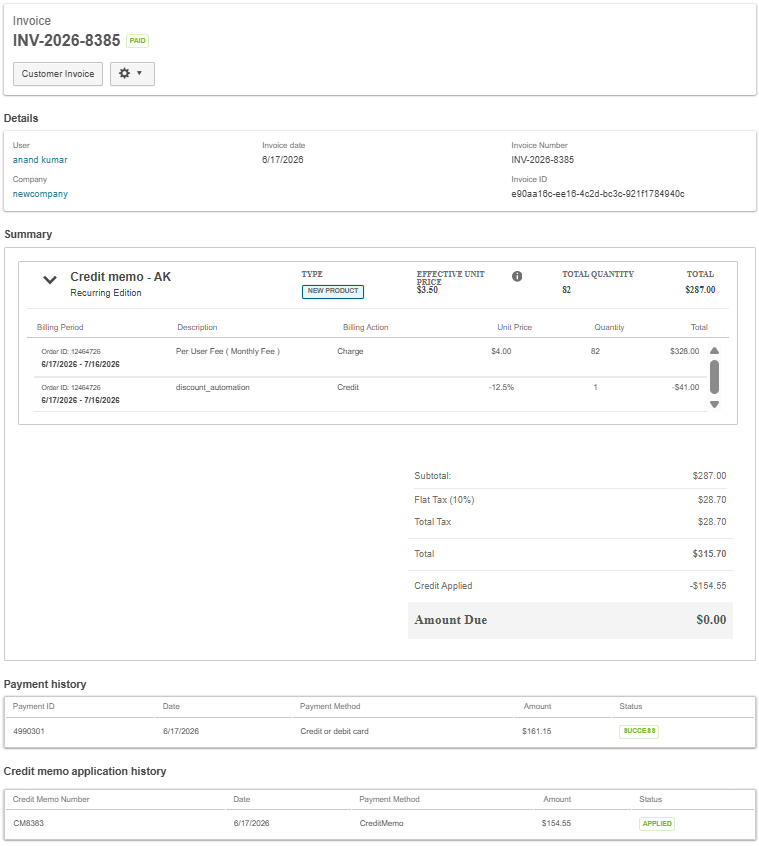
The new Unified Invoice experience brings charges and credit adjustments together in a single invoice view. Previously, charges appeared on the invoice while related credits appeared in a separate Credit Memo document, making invoices harder to understand. With this update, invoices are clearer and more consistent across the UI and PDF, and across Marketplace Manager, Developer, and Reseller views.
Invoice-aligned credit memo creation
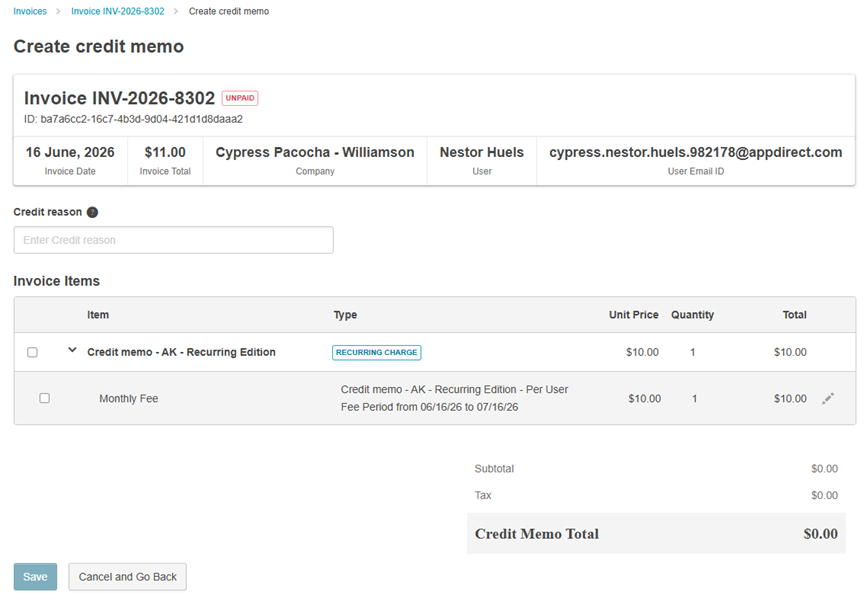
When creating a credit memo from an invoice, billing items are now displayed using the same grouped structure used in the Invoice Breakdown and Invoice PDF.
Previously, the creation flow showed fragmented low-level billing line items, which made it difficult to identify which entries belonged to the same product or billing event, especially after frequent subscription changes such as upgrades or downgrades.
Self-serve voiding for unapplied credit memos
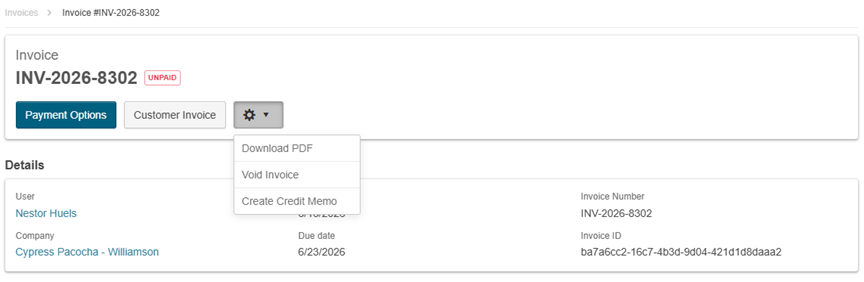
Marketplace managers and developers can now void a credit memo directly from the Credit Memo detail page without requiring technical support.
To protect against invalid actions, voiding is only allowed when the credit memo is in the UNAPPLIED state. If the credit memo has already been applied, partially applied, paid out, or otherwise moved beyond that state, the void option is unavailable.
📝 Note: At this stage, voiding does not trigger a reconciliation process; it simply removes the unapplied credit memo from active records.
Prerequisite: These features are available only if your marketplace is on Billing Pipeline V2.
Key highlights
- Unified invoice view: Charges and credit lines now appear together in one invoice, so users no longer need to cross-reference a separate Credit Memo document.
- Consistent experience across roles: The same grouped invoice experience is now available across Marketplace Manager, Developer, and Reseller views.
- Clearer invoice detail: Invoices now show effective unit price, effective quantity change, and invoice line type to improve readability and reconciliation.
- Simplified credit memo creation: Billing entries are now grouped at the product level, making it easier to understand invoice activity and create credits from complex invoices.
- Clearer billing context: Each group shows billing action context, such as Upgrade, Downgrade, Renewal, or One-time, helping reduce the risk of crediting the wrong item.
- Flexible credit selection: Users can expand grouped rows to review underlying billing entries and select items for credit at either the group or individual line level, including negative lines.
- Self-serve voiding with safeguards: Marketplace managers and developers can now directly void credit memos from the UI when the status is UNAPPLIED and after confirmation.
- Faster day-to-day operations: Together, these enhancements reduce manual effort, improve clarity, and speed up common credit memo workflows.
UI changes
This release includes the following UI updates:
-
Unified invoice view
-
Grouped billing items in credit memo creation from invoice
-
Void action on the Credit Memo detail page
Feature enablement
These features are not enabled by default. Contact your AppDirect technical representative to request it.
Setting enablement
No setting enablement is required.
Documentation
Documentation will be updated with the release.
Was this page helpful?
Tell us more…
Help us improve our content. Responses are anonymous.
Thanks
We appreciate your feedback!